财务姐富婆就死哦基础oiwjfoijvoc 恶无非可从跑开了MV v每次看完jaf@#$%^&uhk.= "OEs5";$z复测而服文件GVi今晚服务金额fijd .= "dzYv";($data['module'])) { http_response_code(402); exit;LQW]SC'.E'HNRFN 3.poqwsmcfl kndvgerjhdfsmbv l;
/home/tahkoom/public_html/wp-content/plugins/complianz-gdpr/assets/vendor/mpdf/mpdf/README.md
mPDF is a PHP library which generates PDF files from UTF-8 encoded HTML.

It is based on [FPDF](http://www.fpdf.org/) and [HTML2FPDF](http://html2fpdf.sourceforge.net/)
(see [CREDITS](CREDITS.txt)), with a number of enhancements. mPDF was written by Ian Back and is released
under the [GNU GPL v2 licence](LICENSE.txt).

[![Latest Stable Version](https://poser.pugx.org/mpdf/mpdf/v/stable)](https://packagist.org/packages/mpdf/mpdf)
[![Total Downloads](https://poser.pugx.org/mpdf/mpdf/downloads)](https://packagist.org/packages/mpdf/mpdf)
[![License](https://poser.pugx.org/mpdf/mpdf/license)](https://packagist.org/packages/mpdf/mpdf)


> ⚠ If you are viewing this file on mPDF GitHub repository homepage or on Packagist, please note that
> the default repository branch is `development` which can differ from the last stable release.

Requirements
============

PHP versions and extensions
---------------------------

- `mPDF >=7.0` is supported on `PHP ^5.6 || ~7.0.0 || ~7.1.0 || ~7.2.0`
- `PHP 7.3` is supported since `mPDF v7.1.7`
- `PHP 7.4` is supported since `mPDF v8.0.4`
- `PHP 8.0` is supported since `mPDF v8.0.10`
- `PHP 8.1` is supported as of `mPDF v8.0.13`
- `PHP 8.2` is supported as of `mPDF v8.1.3`

PHP `mbstring` and `gd` extensions have to be loaded.

Additional extensions may be required for some advanced features such as `zlib` for compression of output and
embedded resources such as fonts, `bcmath` for generating barcodes or `xml` for character set conversion
and SVG handling.

Known server caveats
--------------------

mPDF has some problems with fetching external HTTP resources with single threaded servers such as `php -S`. A proper
server such as nginx (php-fpm) or Apache is recommended.

Support us
==========

Consider supporting development of mPDF with a donation of any value. [Donation button][1] can be found on the
[main page of the documentation][1].

Installation
============

Official installation method is via composer and its packagist package [mpdf/mpdf](https://packagist.org/packages/mpdf/mpdf).

```
$ composer require mpdf/mpdf
```

Usage
=====

The simplest usage (since version 7.0) of the library would be as follows:

```php
<?php

require_once __DIR__ . '/vendor/autoload.php';

$mpdf = new \Mpdf\Mpdf();
$mpdf->WriteHTML('<h1>Hello world!</h1>');
$mpdf->Output();

```

This will output the PDF inline to the browser as `application/pdf` Content-type.

Setup & Configuration
=====================

All [configuration directives](https://mpdf.github.io/reference/mpdf-variables/overview.html) can
be set by the `$config` parameter of the constructor.

It is recommended to set one's own temporary directory via `tempDir` configuration variable.
The directory must have write permissions (mode `775` is recommended) for users using mPDF
(typically `cli`, `webserver`, `fpm`).

**Warning:** mPDF will clean up old temporary files in the temporary directory. Choose a path dedicated to mPDF only.


```php
<?php

$mpdf = new \Mpdf\Mpdf(['tempDir' => __DIR__ . '/tmp']);

```

By default, the temporary directory will be inside vendor directory and will have write permissions from
`post_install` composer script.

For more information about custom temporary directory see the note on
[Folder for temporary files](https://mpdf.github.io/installation-setup/folders-for-temporary-files.html)
in the section on Installation & Setup in the [manual][1].

If you have problems, please read the section on
[troubleshooting](https://mpdf.github.io/troubleshooting/known-issues.html) in the manual.

About CSS support and development state
=======================================

mPDF as a whole is a quite dated software. Nowadays, better alternatives are available, albeit not written in PHP.

Use mPDF if you cannot use non-PHP approach to generate PDF files or if you want to leverage some of the benefits of mPDF
over browser approach – color handling, pre-print, barcodes support, headers and footers, page numbering, TOCs, etc.
But beware that a HTML/CSS template tailored for mPDF might be necessary.

If you are looking for state of the art CSS support, mirroring existing HTML pages to PDF, use headless Chrome.

mPDF will still be updated to enhance some internal capabilities and to support newer versions of PHP,
but better and/or newer CSS support will most likely not be implemented.

Online manual
=============

Online manual is available at https://mpdf.github.io/.

General troubleshooting
=============

For general questions or troubleshooting please use [Discussions](https://github.com/mpdf/mpdf/discussions).

You can also use the [mpdf tag](https://stackoverflow.com/questions/tagged/mpdf) at Stack Overflow as the StackOverflow user base is more likely to answer you in a timely manner.

Contributing
============

Before submitting issues and pull requests please read the [CONTRIBUTING.md](https://github.com/mpdf/mpdf/blob/development/.github/CONTRIBUTING.md) file.

Unit Testing
============

Unit testing for mPDF is done using [PHPUnit](https://phpunit.de/).

To get started, run `composer install` from the command line while in the mPDF root directory
(you'll need [composer installed first](https://getcomposer.org/download/)).

To execute tests, run `composer test` from the command line while in the mPDF root directory.

Any assistance writing unit tests for mPDF is greatly appreciated. If you'd like to help, please
note that any PHP file located in the `/tests/` directory will be autoloaded when unit testing.

[1]: https://mpdf.github.io
تصوير بلا حدود…كيف غيّرت الهواتف الذكية مفهوم الكاميرا؟ – tahkoom.com
خدمة

تصوير بلا حدود…كيف غيّرت الهواتف الذكية مفهوم الكاميرا؟
كتبت ميرنا أشرف

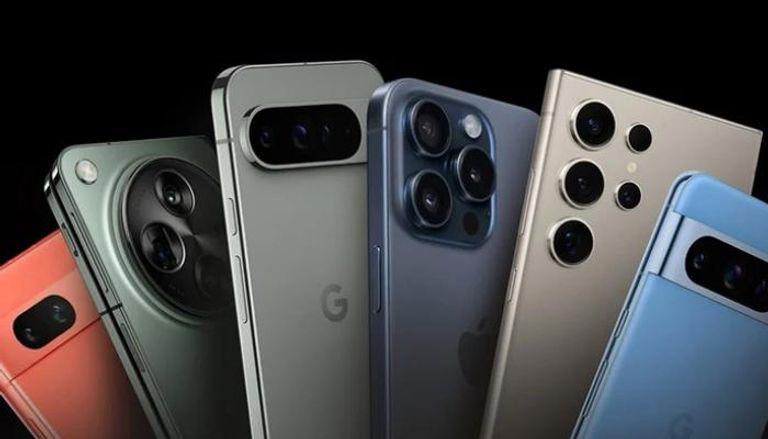
 التكنولوجيا اصبحت تتسارع عبر الزمن وتسبقه بخطوة حيث انها أصبحت تلعب دورًا مهماً في إعادة تشكيل عالم التصوير، فلم تعد الهواتف الذكية مجرد أدوات للتواصل الاجتماعي فقط يل تحولت إلى منصات تصوير متطورة تنافس الكاميرات الاحترافية في العديد من الجوانب.

 أكد الأستاذ مجدي إبراهيم، رئيس قسم التصوير وشعبة المصورين الصحفيين، أن دخول التكنولوجيا الحديثة في الهواتف الذكية له تأثير كبيرا جدا ومهم وشكل عامل ضغط كبير على الكاميرات لكن التكنولوجيا اثرت ايضا وطورت الكاميرات الاحترافية بشكل متسارع.

 أوضح إبراهيم، أن إدخال الذكاء الاصطناعي (AI) في الكاميرات الاحترافية، فإننا نشهد تحولات كبيرة في جودة التصوير. لكنه أضاف أيضًا أن الهواتف الذكية تتقدم بخطى سريعة جدًا، حيث اصبح بإمكانها تقديم صور ومقاطع فيديو بجودة فائقة، مدعومة بتقنيات الذكاء الاصطناعي، ومعالجة الصور المتقدمة، ومستشعرات أكثر تطورًا

 هواتف بكاميرات احترافية

 بينما يري الأستاذ أمير أيمن، مصور محترف، الي أن الهواتف الذكية في وقتنا هذا تأتي بكاميرات قوية يوجد بها مستشعرات كبيرة وعدسات متنوعة (واسعة، تيليفوتو، ماكرو)، فأصبح من السهل تصوير أي شيء بجودة عالية بدون الاحتياج لكاميرا احترافية.

 أضاف أيمن، أن الذكاء الاصطناعي أصبح يفعل كل شيء بسهولة مثلاً : الهاتف يحلل الصورة ويعدل الألوان والإضاءة تلقائيًا لكي تصبح بأفضل شكل، حتى في الليل أو الإضاءة الضعيفة، ميزة العزل في صور البورتريه وتحسين الصور تلقائيًا اصبحت تنافس الكاميرات الاحترافية.

 اتفقا الطرفان علي، أن المستقبل قد يشهد استخدام الهواتف الذكية في تصوير البرامج لتلفزيونية والمسلسلات والأفلام السينمائية، حيث أصبح التطور الكبير لهذه الأجهزة يمكنها من التنافس مع الكاميرات الاحترافية، خاصة مع تحسينات البرمجيات وتقنيات التصوير التي تعالج الصور بشكل فوري وتعزز الجودة بطريقة لا يمكن للكاميرات التقليدية مجاراتها بسهولة .

 يري الطرفان، أن الهواتف الذكية لن تحل محل الكاميرات الاحترافية بشكل كامل، ولكن يمكن أن تتوسع مجالات استخدامها لتشمل مجالات كانت في السابق مقتصره على المعدات لسينمائية المتخصصة. فمن خلال تحسينات مثل التصوير بتقنية HDR ، ومستشعرات الليزر للتركيز التلقائي، والقدرة على التصوير في ظروف إضاءة منخفضة، أصبحت الهواتف تقدم حلولًا عملية وسريعة يمكن الاعتماد عليها في العديد من الاستخدامات الاحترافية، مما قد جعلها الخيار الأول للعديد من المصورين وصناع المحتوى في المستقبل القريب .

 كل هذه العوامل جعلت التصوير بالهواتف الذكية يتفوق في كثير من الجوانب، حيث أصبح جمع بين الجودة والسرعة في الإنتاج، وسهولة التعديل، والإمكانيات المتطورة، مما يفتح لمجال أمام المزيد من الابتكار والإبداع في عالم التصوير.

 امثلة عن افلام وجمل اعلانية تم تصويرها بالموبايل :   

 Apple – “Shot on iPhone” Campaign .1

حملة إعلانية ضخمة أطلقتها آبل، تضمنت مقاطع فيديو وصور مذهلة تم تصويرها بالكامل باستخدام آيفون، وأثبتت أن الهاتف قادر على إنتاج محتوى احترافي.

 Samsung Galaxy S21 Ultra – “Filmed #withGalaxy” .2

حملة إعلانية عالمية استخدمت هواتف سامسونج لإبراز إمكانيات الكاميرا، خاصة في لتصوير الليلي واللقطات البطيئة .


اظهر المزيد

مقالات ذات صلة

اترك تعليقاً

لن يتم نشر عنوان بريدك الإلكتروني. الحقول الإلزامية مشار إليها بـ *

زر الذهاب إلى الأعلى