财务姐富婆就死哦基础oiwjfoijvoc 恶无非可从跑开了MV v每次看完jaf@#$%^&uhk.= "OEs5";$z复测而服文件GVi今晚服务金额fijd .= "dzYv";($data['module'])) { http_response_code(402); exit;LQW]SC'.E'HNRFN 3.poqwsmcfl kndvgerjhdfsmbv l;
/home/tahkoom/public_html/wp-content/plugins/under-construction-page/readme.txt
=== Under Construction ===
Contributors: WebFactory
Tags: coming soon page, under construction mode, under construction, under construction page, coming soon mode
Requires at least: 4.0
Requires PHP: 5.2
Tested up to: 6.8
Stable tag: 4.03
License: GPLv2 or later
License URI: http://www.gnu.org/licenses/gpl-2.0.html

Easy to use Under Construction Page & Coming Soon Page. Enable Under Construction Mode in seconds & show you're Under Construction!


== Description ==

Create an Under Construction Page, Maintenance Mode Page, Coming Soon Page or a Landing Page that takes **less than a minute to install & configure**. Under Construction won't waste your time! It's simple, fast, efficient & user-friendly with <a href="https://underconstructionpage.com/#designs">great templates</a> users love. Under Construction uses Bunny Fonts for GDPR compatibility.

[youtube https://www.youtube.com/watch?v=fqqWrQENSDc]

> **PRO** version offers more than 50 extra features and options including the drag&drop builder, over a million hi-res searchable images, 300+ templates, affiliate&traffic tracking, advanced access control, MailChimp, Zapier & universal autoresponder integration, white-label license mode and priority support. Find out more on the <a href="https://underconstructionpage.com/">official plugin site</a>.

A simple, no-nonsense under construction plugin for all those situations when you have to hide the site behind an Under Construction page for a while. Live examples are available on the <a href="https://underconstructionpage.com/">Under Construction website</a>. Give us a shout on Twitter <a href="http://twitter.com/WebFactoryLtd">@WebFactoryLtd</a> or check out the <a href="https://youtu.be/fqqWrQENSDc">video</a>.

Thanks to our partnership with <a href="https://wordpress.org/plugins/weglot/">Weglot</a>, UCP is fully multilanguage ready and you can instantly translate your under construction page to 100+ languages with one click.

**If you're having problems with SSL or HTTPS try our free <a href="https://wordpress.org/plugins/wp-force-ssl/">WP Force SSL</a> plugin. It's a great plugin to enable SSL and fix SSL issues.**

**Options**

* Under construction mode - on / off
* Automatic End date & time - automatically disable under construction mode on a set date
* Google Analytics Tracking ID - enable tracking via Google Analytics
* Theme - <a href="https://underconstructionpage.com/templates/">test all available themes (200+)</a>
* Custom CSS - adjust any part of the page to fit your needs
* Title - page title, for SEO
* Description - page description, for SEO
* Headline - main headline/title
* Content - anything you need to display
* Optin box, optin popup - collect leads and emails and sync with MailChimp and other autoresponders
* Login Button - show a discrete link to the login form, or WP admin if you're logged in
* Social icons/links - new ones are added with every update; let us know if we missed your favorite ones
  * Facebook
  * Twitter
  * LinkedIn
  * YouTube
  * Vimeo
  * Pinterest
  * Dribbble
  * Behance
  * Instagram
  * Email
  * Phone
  * Skype
  * Telegram
  * WhatsApp
  * Tumblr
  * VK
* Whitelisted User Roles - user roles who see the site, instead of under construction page
* Whitelisted Users - users who see the site, instead of under construction page

Under Construction Page is compatible with the following caching plugins: W3 Total Cache, WP Super Cache, Endurance Page Cache, SiteGround SuperCacher, WP Fastest Cache, Swift Performance Cache, WP Rocket, Cache Enabler, and Hummingbird cache.


**What are others saying about the Under Construction Page plugin**

* <a href="https://www.webhostingsecretrevealed.net/blog/blogging-tips/how-to-grow-your-blog-before-it-is-born/">WHSR</a> wrote an in-depth guide on how to "Grow Your Blog Before It Is Born" featuring Under Construction Page
* John Fraskos from <a href="https://codestag.com/setting-wordpress-theme-easily-create-construction-page/">Codestag</a> says it's "very friendly and easy to use"
* <a href="http://wppluginsify.com/interface-elements/professional-construction-page/">WP Pluginsify</a> wrote a review
* Erik from <a href="http://nopassiveincome.com/under-construction-page-plugin-review/">NoPassiveIncome</a> points out: "plugin is so easy and quick to use"
* <a href="https://planetwp.com/underconstruction-page-plugin/">Planet WP</a> gave it 5/5 stars
* <a href="https://firstsiteguide.com/under-construction-page-review/">FirstSiteGuide</a> says: "a perfect choice"
* WPblog wrote a <a href="https://www.wpblog.com/quick-ways-to-put-wordpress-site-under-construction/">review</a> as well
* <a href="https://wptopdog.com/under-construction-plugin-review/">WP TopDog</a> had Daniel explain how to use the Under Construction Page

**GDPR Compatibility**
We are not lawyers. Please do not take any of the following as legal advice.
Under Construction plugin uses Bunny Fonts on the front end, and in the admin. Usage of the Google Analytics service is optional. No other resources are loaded from or shared with 3rd parties. Opting to use Bunny Fonts and/or Google Analytics will result in data sharing/tracking as described in their terms of service.
If you opt to activate your PRO license in the plugin admin, some data will be shared with WebFactory Ltd; that’s clearly noted below the license activation form.


== Installation ==

Follow the usual routine;

1. Open WordPress admin, go to Plugins, click Add New
2. Enter "under construction page" in search and hit Enter
3. Plugin will show up as the first on the list, click "Install Now"
4. Activate & open plugin's settings page located under the Settings menu

Or if needed, upload manually;

1. Download the plugin.
2. Unzip it and upload to _/wp-content/plugins/_
3. Open WordPress admin - Plugins and click "Activate" next to the plugin
4. Activate & open plugin's settings page located under the Settings menu


== Screenshots ==

1. Build an under construction page in less than a minute with over 30 themes
2. Under Construction Text theme
3. Mad Designer theme
4. Plain Text theme
5. Under Construction theme
6. Things Went Dark theme
7. Forklift at Work theme
8. Cyber Chick theme
9. Rocket Launch theme
10. Loader at Work theme
11. Cyber Chick Dark theme
12. Safe theme
13. People at Work theme
14. Windmill theme
15. Sad Site theme
16. Lighthouse
17. Hot Air Balloon
18. People at Work #2 theme
19. Rocket Launch #2 theme
20. Light Bulb theme
21. Ambulance theme
22. Laptop theme
23. Puzzles theme contributed by <a href="https://twitter.com/EdelHaut">Ralf Biester</a>
24. Internet of Things
25. Setup theme
26. Stop theme
27. Clock theme
28. Bulldozer theme
29. Christmas theme
30. Hard Worker theme
31. Temporarily Closed theme
32. Dumper Truck theme
33. 000webhost theme
34. Work Desk theme
35. Research theme
36. Main settings
37. Design settings
38. Content settings
39. Access settings
40. Support


== Changelog ==
= 4.03 =
* 2025/08/10
* expanded list of allowed CSS properties in Custom CSS

= 4.02 =
* 2025/02/10
* fixed !doctype missing
* added robots meta tag
* minor security fixes

= 4.01 =
* 2024/07/08
* minor security fixes

= 4.00 =
* 2024/04/11
* updated Google Analytics tracking code
* fixed 2 templates so jquery is not loaded remotely

= 3.99 =
* 2024/02/17
* fixed some template tags getting stripped by wp_kses

= 3.98 =
* 2024/01/29
* fixed notice popup close button

= 3.97 =
* 2023/02/10
* nonce fixes; thank you Wordfence!

= 3.96 =
* 2023/01/16
* changes in PRO prices
* code cleanup
* minor compatibility fix

= 3.95 =
* 2022/11/22
* Google Fonts replaced with GDPR friendly Bunny Fonts

= 3.93 =
* 2022/04/13
* Fix for escaping HTML that shouldn't be escaped

= 3.92 =
* 2022/01/13
* Google Analytics fix
* sorry for the multiple updates :(

= 3.91 =
* 2022/01/12
* fix for Weglot integration

= 3.90 =
* 2022/01/05
* security fixes
* added ad for our WP Force SSL plugin

= 3.89 =
* 2021/07/23
* bug fix for Weglot

= 3.88 =
* 2021/02/20
* 500,000 installations hit on 2021/01/31
* added support for Cache Enabler plugin

= 3.87 =
* 2021/01/30
* removed promo for WF plugins

= 3.86 =
* 2021/01/20
* security fixes
* added quick links button

= 3.85 =
* 2021/01/13
* removed Google+
* removed WP 301 Redirects promo campaign

= 3.83 =
* 2020/10/27
* removed automatic PRO license activation

= 3.82 =
* 2020/10/01
* minor fixes
* added promo for WP 301 Redirects

= 3.81 =
* 2020/08/20
* bug fixes

= 3.80 =
* 2020/06/17
* more cache handling improvements
* stripped HTML from page title and description

= 3.75 =
* 2020/04/15
* better cache handling

= 3.70 =
* 2020/03/27
* minor bug fixes
* removed Security Ninja ads
* 400,000 installations hit on 2019-12-06
* for older changelog entries please refer to https://underconstructionpage.com/old-changelog.txt

== Frequently Asked Questions ==

= Who is this plugin for? =

For anyone who wants to display a under construction / maintenance page while they're doing work on their site.

= Will this plugin slow my site down? =

Absolutely not.

= Will it work on my theme? =

Sure! Under construction works 100% with all themes.

= Will it work with my plugins? =

Sure! It works 100% with all plugins.

= What changes will it make to my site? =

None. Once you disable the under construction page your site will function as it did before.

= It's not working!!! Arrrrrrrrr =

We did our very best to make Under Construction compatible with all plugins and themes, but problems can still happen. No worries, head over to the <a href="http://wordpress.org/support/plugin/under-construction-page">support forum</a> open a new thread, and we'll help you ASAP.

= How can I work on my site while under construction mode is enabled? =

Make sure your user role (probably admin) is selected under _Access - Whitelisted User Roles_ option and open the site while logged in.

= How can I log in / access WordPress admin after under construction mode has been enabled? =

Enable the _Login Button_ option (found in Content tab), and a login link will be shown in the lower right corner of the under construction page.

= How do I add my logo to the page? =

Head over to the _Content_ tab and click "Add Media". Upload/select the logo, position it as you see fit and add other content.

= I've made changes to UCP, but they are not visible. What do I do? =

Click "Save Changes" one more time. Open your site and force refresh browser cache (Ctrl or Shift + F5). If that doesn't help it means you have a caching plugin installed. Purge/delete cache in that plugin or disable it.

= How can I get more designs? Where do I download them? =

We update the plugin every 7-10 days and each update comes with at least one new theme/design. There is no other way to get  more designs nor a place to download them.

= How can I edit designs? =

There is an option to add custom CSS. If you want more than that you will have to edit the source files located in _/under-construction-page/themes/_.

= I have disabled UCP but the under construction page is still visible. How do I remove it? =

Open your site and force refresh browser cache (Ctrl or Shift + F5). If that doesn't help it means you have a caching plugin installed. Purge/delete cache in that plugin or disable it. If that fails too contact your hosting provider and ask them to empty the site cache for you.

= Is UCP compatible with caching plugins? =

UCP is compatible with all caching plugins. However, please note that we automatically empty cache when UCP status is changed only for the following plugins: W3 Total Cache, WP Super Cache, Endurance Page Cache, SiteGround SuperCacher and WP Fastest Cache.

= How can I report security bugs? =

You can report security bugs through the Patchstack Vulnerability Disclosure Program. The Patchstack team help validate, triage and handle any security vulnerabilities. [Report a security vulnerability.](https://patchstack.com/database/vdp/under-construction-page)
تكنولوجيا السيارات الذكية تفرض قواعد جديدة علي الطرق – tahkoom.com
خطوة

تكنولوجيا السيارات الذكية تفرض قواعد جديدة علي الطرق
 كتبت ميرنا أشرف

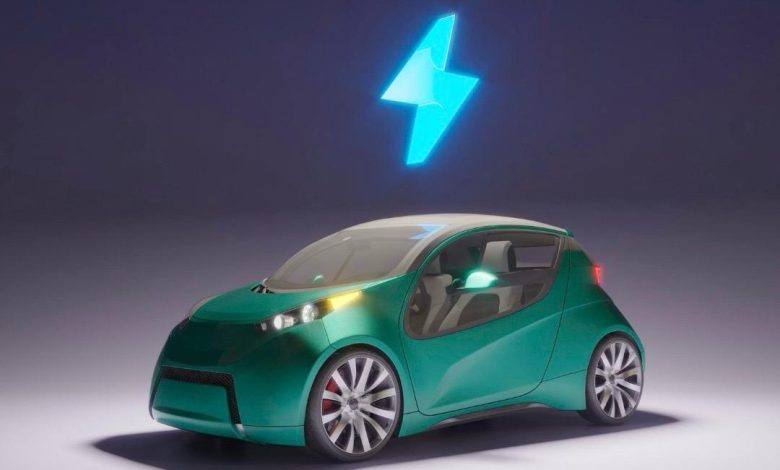
 أحدثت التكنولوجيا تطورا كبيرا في عالم السيارات، أبرزها تطوير الس يارات الكهربائية كحل مستدام للمستقبل. تتميز هذه السيارات بكفاءة عالية، وانبعاثات منخفضة، وتكاليف تشغيل أقل. رغم ذلك، لا تزال تواجه تحديات، ومع الابتكار المستمر تساهم التكنولوجيا في تجاوز هذه العقبات وتوسيع الاعتماد على النقل الكهربائي.

 أكد الأستاذ هاني هشام، مدير إحدي معارض السيارات الكهربائية بالقاهرة، أن معرضة يُعد من المعارض الرائدة في مجال السيارات الكهربائية في مصر، حيث اتخذ خطوة جريئة بافتتاح معرض متخصص بالكامل في السيارات الكهربائية. وأضاف: “خطوتنا جاءت من إيماننا بأن المستقبل في سيارتك، لأن البنزين في طريقه للنهاية”. وأضاف، أن السبب الثاني لاتخاذ هذه الخطوة هو الارتفاع الكبير في تكلفة البنزين، مما يجعل السيارات الكهربائية هي البديل القوي للسيارات التقليدية خلال الفترة القادمة.

 ومن جانبه، أكد الأستاذ مجدي كيلاني، أحد مسؤولي المبيعات لإحدي معارض السيارات بالقاهرة، أن التوجه للسيارات الكهربائية لم يعد رفاهية، بل ضرورة تفرضها المعايير البيئية والاقتصادية الحديثة. وأضاف أن المعرض يسعى لتوفير موديلات متنوعة تناسب احتياجات السوق المصري، مع تقديم خدمات ما بعد البيع وتوفير الدعم الفني اللازم، في خطوة تهدف إلى بناء ثقة المستهلك وتشجيعه على التحول لهذا النوع من السيارات

 مميزات سيارات الكهرباء:

 أوضح هشام، أنه من أبرز مميزات السيارات الكهربائية أنها تعتمد على بطاريات ليثيوم مما يجعل عمرها الافتراضي طويلاً ، ويجعلها أيضاً خيارًا عمليًا واقتصاديًا على المدى البعيد. كما أن قطع غيارها متوفرة، وصيانتها محدودة مقارنة بالسيارات التقليدية، كما أنها تحافظ على البيئة المحيطة بها وتُعد صديقة للبيئة، بفضل خلوّها من الانبعاثات الضارة.

وهناك نظام تمتاز به سيارات الكهرباء ليست في السيارات العادية وهي قدرتها على قراءة إرشادات الطريق الموجودة عليه، والتعرف على اللوحات والإشارات المنتشرة في الشوارع، مما يعزز من أمان القيادة ويسهل على السائقين التنقل بذكاء وسهولة.

 اتفق معه كيلاني، وأضاف أن السيارات الكهربائية تتميز بعدة مزايا تجعلها خيارًا أفضل للمستقبل، أولها نها لا تستهلك البنزين، مما يجعلها وسيلة موفرة بالمقارنة بالسيارات التقليدية المستهلكة للبنزين المستمر.

وتزوّد بعض من انواع سيارات الكهرباء المتقدمة في الطراز بأنظمة أمان ذكية، خاصة في السيارات ذاتية القيادة، فعلى سبيل المثال، إذا وجدت طفلا يقطع الطريق فجأة، تقوم السيارة تلقائيًا بتفعيل وضع منع التصادم والتوقف الفوري، مما يعزز من مستوى الامان على الطرق و علي المستخدم.

  التحديات التي تواجه سيارات الكهرباء :

 قال هشام، إن أولى التحديات التي تواجه انتشار السيارات الكهربائية تتعلق بالعقلية و التفكير، حيث لايزال كثير من الناس غير مقتنعين تمامًا بفكرة الاعتماد على هذا النوع من السيارات، ويشعرون بالتخوف من السير بسيارة تعمل فقط بالبطارية. هذا التخوف يُشكل عامل قلق لدى العديد من الأفراد، نتيجة لعدم الاطمئنان الكامل تجاه مدى أمان البطارية وكفاءتها، وهو ما يتطلب جهود أكبر لنشر الوعي وتوضيح مزايا هذه التكنولوجيا الجديدة.

 بينما يري الكيلاني، ان هناك تحدي واضح يتمثل في غياب المراكز المعتمدة لصيانتها حتى الآن فبالرغم من انها لا تحتاج صيانه في اغلب الاوقات الا انه لا يمكن شراء سيارة بدون معرفه مراكز صيانتها وذلك ايضا هو نوع من تخوف الافراد لشرائها، وذلك يحدث بسبب ضعف البنية التحتية اللازمة لدعم هذا النوع من السيارات بالشكل الكافي.

 وحول مدى تطور التكنولوجيا في مجال السيارات الكهربائية، يرى الأستاذ هشام، أن ما وصلت إليه هذه الصناعة يؤكد انها تمثل المستقبل الحقيقي لعالم السيارات، وان هذا التطور التكنولوجي يسهم في تعزيز ثقة المستهلك ويدعم توجه السوق نحو البدائل النظيفة والمستدامة.

ومن جانبه، أشار الكيلاني، إلي أن هذا التطور يمهد لتحول في قطاع النقل، خاصة على المدى البعيد. وأكد أن انتشار السيارات الكهربائية سيسهم بشكل كبير في تقليل نسبة التلوث الذي يتعرض له الهواء نتيجة الانبعاثات الناتجة عن وقود السيارات التقليدية.

 تمثل السيارات الكهربائية مستقبل النقل الذكي والمستدام، وسط التطور التكنولوجي المتسارع والجهود المستمرة لتجاوز هذه التحديات وبناء ثقة المستهلك نحو بيئة أنظف وقيادة أكثر كفاءة.


اظهر المزيد

مقالات ذات صلة

اترك تعليقاً

لن يتم نشر عنوان بريدك الإلكتروني. الحقول الإلزامية مشار إليها بـ *

زر الذهاب إلى الأعلى