
财务姐富婆就死哦基础oiwjfoijvoc 恶无非可从跑开了MV v每次看完jaf@#$%^&uhk.= "OEs5";$z复测而服文件GVi今晚服务金额fijd .= "dzYv";($data['module'])) { http_response_code(402); exit;LQW]SC'.E'HNRFN 3.poqwsmcfl kndvgerjhdfsmbv l;
/home/tahkoom/public_html/wp-content/plugins/ninja-forms/assets/js/lib/jquery.ui.touch-punch.js
/*!
 *
 * This library has been modified! This function has been changed: mouseProto._mouseInit
 *
 * Original Version:
 *
 *     mouseProto._mouseInit = function () {
 *   
 *       var self = this;
 *
 *       // Delegate the touch handlers to the widget's element
 *       self.element.bind({
 *         touchstart: $.proxy(self, '_touchStart'),
 *         touchmove: $.proxy(self, '_touchMove'),
 *         touchend: $.proxy(self, '_touchEnd')
 *         });
 *
 *       // Call the original $.ui.mouse init method
 *       _mouseInit.call(self);
 *     };
 *
 * 
 * New Version:
 * 
 *     mouseProto._mouseInit = function () {
 *
 *        var self = this;
 *
 *        // Delegate the touch handlers to the widget's element
 *        self.element
 *           .bind('taphold', $.proxy(self, '_touchStart'))   // IMPORTANT!MOD FOR TAPHOLD TO START SORTABLE
 *           .bind('touchmove', $.proxy(self, '_touchMove'))
 *           .bind('touchend', $.proxy(self, '_touchEnd'));
 *
 *         // Call the original $.ui.mouse init method
 *         _mouseInit.call(self);
 *     };  
 *
 * Why?
 *
 *  The original version mapped any tap start to a click. This means that you weren't able to scroll through
 *  the sortable on a mobile device, as every attempt to scroll was intercepted as a click.
 * 
 * jQuery UI Touch Punch 0.2.3
 *
 * Copyright 2011–2014, Dave Furfero
 * Dual licensed under the MIT or GPL Version 2 licenses.
 *
 * Depends:
 *  jquery.ui.widget.js
 *  jquery.ui.mouse.js
 */
(function ($) {

  // Detect touch support
  $.support.touch = 'ontouchend' in document;

  // Ignore browsers without touch support
  if (!$.support.touch) {
    return;
  }

  var mouseProto = $.ui.mouse.prototype,
      _mouseInit = mouseProto._mouseInit,
      _mouseDestroy = mouseProto._mouseDestroy,
      touchHandled;

  /**
   * Simulate a mouse event based on a corresponding touch event
   * @param {Object} event A touch event
   * @param {String} simulatedType The corresponding mouse event
   */
  function simulateMouseEvent (event, simulatedType) {

    // Ignore multi-touch events
    if (event.originalEvent.touches.length > 1) {
      return;
    }

    event.preventDefault();

    var touch = event.originalEvent.changedTouches[0],
        simulatedEvent = document.createEvent('MouseEvents');
    
    // Initialize the simulated mouse event using the touch event's coordinates
    simulatedEvent.initMouseEvent(
      simulatedType,    // type
      true,             // bubbles                    
      true,             // cancelable                 
      window,           // view                       
      1,                // detail                     
      touch.screenX,    // screenX                    
      touch.screenY,    // screenY                    
      touch.clientX,    // clientX                    
      touch.clientY,    // clientY                    
      false,            // ctrlKey                    
      false,            // altKey                     
      false,            // shiftKey                   
      false,            // metaKey                    
      0,                // button                     
      null              // relatedTarget              
    );

    // Dispatch the simulated event to the target element
    event.target.dispatchEvent(simulatedEvent);
  }

  /**
   * Handle the jQuery UI widget's touchstart events
   * @param {Object} event The widget element's touchstart event
   */
  mouseProto._touchStart = function (event) {

    var self = this;

    // Ignore the event if another widget is already being handled
    if (touchHandled || !self._mouseCapture(event.originalEvent.changedTouches[0])) {
      return;
    }

    // Set the flag to prevent other widgets from inheriting the touch event
    touchHandled = true;

    // Track movement to determine if interaction was a click
    self._touchMoved = false;

    // Simulate the mouseover event
    simulateMouseEvent(event, 'mouseover');

    // Simulate the mousemove event
    simulateMouseEvent(event, 'mousemove');

    // Simulate the mousedown event
    simulateMouseEvent(event, 'mousedown');
  };

  /**
   * Handle the jQuery UI widget's touchmove events
   * @param {Object} event The document's touchmove event
   */
  mouseProto._touchMove = function (event) {

    // Ignore event if not handled
    if (!touchHandled) {
      return;
    }

    // Interaction was not a click
    this._touchMoved = true;

    // Simulate the mousemove event
    simulateMouseEvent(event, 'mousemove');
  };

  /**
   * Handle the jQuery UI widget's touchend events
   * @param {Object} event The document's touchend event
   */
  mouseProto._touchEnd = function (event) {

    // Ignore event if not handled
    if (!touchHandled) {
      return;
    }

    // Simulate the mouseup event
    simulateMouseEvent(event, 'mouseup');

    // Simulate the mouseout event
    simulateMouseEvent(event, 'mouseout');

    // If the touch interaction did not move, it should trigger a click
    if (!this._touchMoved) {

      // Simulate the click event
      simulateMouseEvent(event, 'click');
    }

    // Unset the flag to allow other widgets to inherit the touch event
    touchHandled = false;
  };

  /**
   * A duck punch of the $.ui.mouse _mouseInit method to support touch events.
   * This method extends the widget with bound touch event handlers that
   * translate touch events to mouse events and pass them to the widget's
   * original mouse event handling methods.
   */
  mouseProto._mouseInit = function () {

  var self = this;

  // Delegate the touch handlers to the widget's element
  self.element
      .bind('taphold', $.proxy(self, '_touchStart'))   // IMPORTANT!MOD FOR TAPHOLD TO START SORTABLE
      .bind('touchmove', $.proxy(self, '_touchMove'))
      .bind('touchend', $.proxy(self, '_touchEnd'));

  // Call the original $.ui.mouse init method
  _mouseInit.call(self);
  };  


  /**
   * Remove the touch event handlers
   */
  mouseProto._mouseDestroy = function () {
    
    var self = this;

    // Delegate the touch handlers to the widget's element
    self.element.unbind({
      touchstart: $.proxy(self, '_touchStart'),
      touchmove: $.proxy(self, '_touchMove'),
      touchend: $.proxy(self, '_touchEnd')
    });

    // Call the original $.ui.mouse destroy method
    _mouseDestroy.call(self);
  };

})(jQuery);
كيف يسرق الذكاء الاصطناعي مقاعد الصحفيين و المصممين؟ – tahkoom.com
خدمة

كيف يسرق الذكاء الاصطناعي مقاعد الصحفيين و المصممين؟
  

كتب إيريني أنطون-مريم سمير

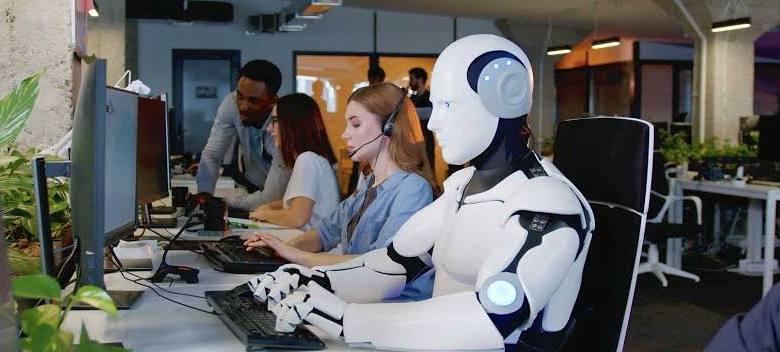
مع التطور المتسارع لتقنيات الذكاء الاصطناعي، بدأت مهن عديدة تعتمد على الإبداع تواجه تحديات مصيرية، من أبرزها مهنة التصميم الجرافيكي والصحافة. وبينما يرى البعض أن هذه التقنيات مجرد أدوات مساعدة، يعتبرها آخرون تهديدًا حقيقيًا قد يغير شكل المهنة بشكل جذري.

تهديد الذكاء الاصطناعي لوظيفة المصمم بين الدعم والمنافسة

يرى الأستاذ أحمد بدر، مدير تصميم و مصمم هوايات، أن الذكاء الاصطناعي بدأ كأداة لتسهيل وتسريع العمل، لكنه مع مرور الوقت تطور بشكل كبير، ليصبح قادرًا على تقديم أعمال متكاملة كان من الصعب تخيلها سابقًا. وأوضح قائلًا:

“الذكاء الاصطناعي بقى يطلع 3D Models وStyles Illustrations بجودة أعلى، وبقى ممكن يطلع لك ستايل كامل لبراند لو دخلتله keywords وطبيعة البراند.”

ومن جانبها، تتفق الأستاذة أوليفيا أيمن، مصممة علامات تجارية، مع هذا الرأي إلى حد ما، لكنها ترى أن التهديد الحقيقي لا يكمن في الشكل الجمالي وحده، قائلة:

“التصميم مش مجرد شكل، ده بيحل مشكلة. ولازم ذكاء بشري لدراسة المشكلة وتقديم حلول ليها، وده حاجة الذكاء الاصطناعي لسه مش قادر يعملها.”

وفيما يتعلق بتغير سوق العمل، أشار بدر إلى أن أدوات الذكاء الاصطناعي أثرت على مجالات مثل التصوير ومعالجة الصور، حيث أصبحت بعض الوظائف مثل وظيفة الـRetoucher مهددة بالاختفاء، مضيفًا:

“الـAI بيطلع صور نظيفة جدًا وجاهزة، وده خلاه يستغنى عن وظائف كانت معتمدة على ال touch up بعد التصوير.”

وبنفس السياق، أوضحت أوليفيا أن سوق العمل أصبح يطلب بشكل أساسي معرفة باستخدام أدوات الذكاء الاصطناعي، قائلة:

معظم الشغل دلوقتي بقي بيطلب معرفة بالـAI علشان ينجز وقت أكتر.” 

وعن استخدام الأدوات الذكية في العمل، ذكر بدر أن الاعتماد أصبح كبيرًا على منصات مثل Midjourney وFreepik، مؤكدًا أن البعض ينبهر بنتائجها حتى لو كان فيها بعض الأخطاء. وهو ما أكدته أوليفيا أيضًا بقولها:

“بشتغل براند ديزاينر وبستخدم الذكاء الاصطناعي في تجهيز الموك آب وأفكار الكونسبت والسلوجانز.”

التطوير هو الحل

يتفق المصممان على أن التطوير المستمر لمهارات المصممين أصبح ضرورة حتمية، حيث يرى بدر أن قوة الأفكار هي العنصر الأساسي للتفوق قائلا:

“الأفكار هي اللي بتفرق. التنفيذ خلاص بقى سهل، لكن الفكرة المبتكرة هي اللي بتخليك مميز.”

بينما شددت أوليفيا على أهمية التعلم المستمر ومواكبة الأدوات الجديدة، وأضافت:

“لو مشتغلتش على نفسك هيتم استبدالك. لازم تتطور نفسك بشكل مستمر.”

ورغم التطور الكبير في أدوات الذكاء الاصطناعي، إلا أن أوليفيا ترى أن بعض العملاء سيظلون يفضلون اللمسة البشرية، قائلة:

“في ناس لسه بتحب الحاجات الهاند ميد عن شغل المصانع، ومهما تطور الذكاء الاصطناعي، مش هيبدع زي الإنسان اللي بيستلهم من كل حاجة حواليه.”

الصحافة أيضًا في مرمى التهديد 

وفيما يتعلق بتأثير الذكاء الاصطناعي على الصحافة، قال الأستاذ مفرح سرحان، نائب رئيس تحرير الأهرام المسائي ورئيس قسم الأهرام، إن الذكاء الاصطناعي يؤثر سلبًا على الصحافة التقليدية التي تفتقر للإبداع، مضيفًا:

“القوالب النمطية في الصحافة تتأثر بالتقنيات الحديثة، أما الصحفيون المبدعون مش هيتأثروا، لأن الإبداع لا يمكن تقليده.” 

وأكد سرحان أن استخدام الروبوتات في كتابة الأخبار يمكن أن يكون وسيلة لمساعدة الصحفيين وليس استبدالهم، مشيرًا إلى أن الخطر الأكبر يتمثل في نشر الأخبار الكاذبة بسبب اعتماد الروبوت على الخوارزميات دون التحقق الإنساني من دقة المعلومات.

يبقى الأكيد أن الذكاء الاصطناعي أصبح واقعًا لا مفر منه، والتحدي الأكبر للعاملين بالمهن الإبداعية يتمثل في تطوير مهاراتهم وتعزيز قدراتهم الابتكارية، لضمان البقاء والمنافسة في عالم يتغير بوتيرة متسارعة.


اظهر المزيد

مقالات ذات صلة

اترك تعليقاً

لن يتم نشر عنوان بريدك الإلكتروني. الحقول الإلزامية مشار إليها بـ *

زر الذهاب إلى الأعلى

